How To Setup And Configure Google Now

In a previous of couple weeks ago i have discuss in this blog about Android Jelly bean new features. and on that post i have mentioned if the new features that most wanted on jelly bean is google now. And today i will tell you How to setup Google Now which is one of the most highlighted features of Android 4.1 Jelly Bean. So you must have a question on your mind, what is Google Now and how to setup or configure it? Check out my answer below.

What is Google Now

Google Now is an application that created to answer your questions and support them through search results. I can sat that Google Now is an application to automate your life and make it easier. Although it is just an application but it is very usefull
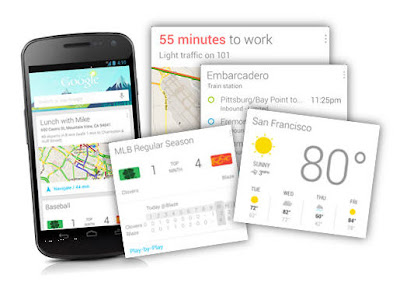
what is google now

Google Now can tell you about the weather, so when one day you will come out google now can tell you the weather before you going outside. It can tells you how much traffic on the street. its very usefull to expect the jam on the traffic so you can choose the way if you want to go anywhere without trapped on traffic jam. this apps also can tell you when can you get next train or plane while you are on the platform or airport area. And Amazingly Google Now can tells all those things automatically on your smartphone which appear throughout the day whenever you need them.


How to Setup Google Now

How to setup Google Now is not a very complex question. so please read my insctruction to setup google now
To setup it, first launch the apps. Google Now can be launched by 2 methods, you can laundh from the lock screen by swiping towards the Google icon. or the 2nd methods is by swiping up from any of your soft keys.
how to configure google now

If you were in the first time launchine google now. just tapping through the welcome screen set up.
Then Scroll down and then menu button its present in the bottom right corner. Once you tap the menu button it will launch Google Now/Voice Search Settings. then tap it customize your cards.
:how

If you want, you also can view some sample cards and configure it from Google Now home screen. to do so, you just simply scroll down to the bottom and then tap on “Show sample cards”.
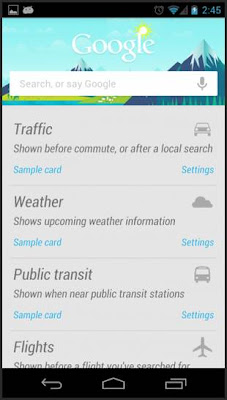
tutorial configure google now

If you you want to customzie it later and just want to know the taste of Google Now then you just leave the settings to default. After you are finished setup the cards, you need to fill it with some data. to do so, you can use Voice Search and then search for your weather, favourite sports team, place for hangout or anything that related to the sample cards.

If you curious and want to get full benefitted then go back to Google Now settings and go to Privacy accounts. You can find that in default mode all of the settings are checked.
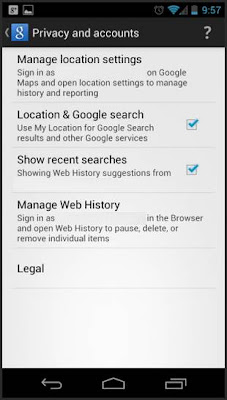
Google-Now-Privacy-Accounts-settings

To manage your map setting Tap o Manage Location Settings. To get the best experience, check the option for “Enable Location History”.
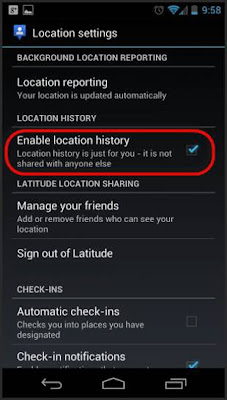
google now location history setting

To activate your Google Now apps in identifying your home and work address correctly, go to Location History in there you will get the option, it the option you must configure your home and work correctly.

OK, now your Google Now apps is fully enabled and ready to show you some cards. You will start getting cards for work/home distance, weather today, and other locations thfat you have set. If you still interested in any other cards, then you just use Voice Search that i have told previously. It will help Google Now to understand that you are interested in those cards also. And Google Now will keep on cellecting information as soon as you put new setting and information.


Google Now Tips and Tricks


  • When once your Cards closed or swiped away from Google Now or notifications are not gone. dontt worry. They will reappear as soon as if there are a change on the data.
  • But if You want to make the cards reappear without wait a change on the data, just simply tap the menu icon at Google Now and then tap on refresh button. But if you still face the problem, then turn Google Now switch off, reboot your phone and then re-enable it.
  • If you want to configure Google Now to notify you when to leave so as to arrive on time. Just go to your calendar, then just add locations.
  • To improves Google Now functionality. You can do it by enabling web history immensely, and you control its setting from – www.google.com/dashboard
Read More..

Jacob Jones and Bigfoot Mystery Episode 1 IPA Download


Jacob Jones and Bigfoot Mystery : Episode 1 IPA [Download]Jacob Jones and the Bigfoot Mystery : Episode 1

App Store EDITORS CHOICE and Number 1 puzzle game.
A small boy, his big new friend, and a huge problem.
Join Camp Eagle Feathers’ newest ‘Brave’, Jacob Jones, on an amazing adventure to uncover just what is going on at Camp Eagle Feather.
From talking foxes and celebrity obsessed barmaids to dimwitted hunters and death-metal fan roommates, this is one summer vacation Jacob will never forget.
Discover what’s lurking in the forest at night, how the the animals can talk, why Mr Grimmel is so angry, what’s in ‘The Cooler’? and exactly what is wrong with Billy Jackson?
Recommended for iPhone4S/iPad2 and above.
10/10 – a fantastic, bite-sized title that’s great for puzzle lovers. – AnalogHype
‘…it’s a lot like a Pixar film – a comparison further verified by the superb cartoon visuals.’ – Beefjack
..”the presentation is exquisite throughout, and we’re already looking forward to the next instalment in this charming series.” – PushSquare
“its visual style and tone is what has caught my attention so far. It’s a very neat looking game” – toucharcade.com
“Basically, Epic should be using this game to demonstrate the flexibility of the engine.” – Joystiq
“…the game looks visually stunning” – aussie-gamer.com
Features:
● A beautiful, interactive 3D world for Jacob to explore.
● Challenging, brain teasing interactive puzzles created by some of the worlds leading puzzle designers.
● An original story written by the BAFTA nominated George Poles.
● A cast of weird and wonderful characters to interact with, each with full voice over.
● Tilt and touch your iPad or iPhone to find hidden objects throughout the world.
What’s New in Version 1.3
New:
Now optimised for iPhone 4
New languages added – Russian, Dutch, Portuguese,Polish, Spanish (in Mexican Region)
Fixes
Additional solution to Pizza puzzle added.
Camera fixes.
Various minor bug fixes and optimisations.
Jacob Jones and Bigfoot Mystery : Episode 1 IPA [Download] Jacob Jones and Bigfoot Mystery : Episode 1 IPA [Download] Jacob Jones and Bigfoot Mystery : Episode 1 IPA [Download] Jacob Jones and Bigfoot Mystery : Episode 1 IPA [Download]
Jacob Jones and Bigfoot Mystery : Episode 1 IPA [Download]
[iPhone/iPad]
Version: 1.3
[Please Report Broken Links]
Read More..

Why you need iPhone 5 Covers and Cases

Usually, the valuable things feature the best cases or protective covers. But, IPhone 4 cases is one kind of those ... http://bit.ly/M1s90f
Read More..

Acer Liquid E2 Review and Specs

Acer Liquid E2 Review and Specs - Hy guys, today I want to share you about the new smartphone by Acer. Acer Liquid E2 comes with a Quad Core on the processor, this smartphone comes with dual-SIM capability. What about performance?

Design

Dimension: 131 x 68 x 9.9mm and weighs 140 grams. Acer Liquid E2 has a compact and ergonomic design. For the casing, this phone uses a blend of plastic and aluminum. At the front, the Acer Liquid E2 didnt put the key, utilizing only 3 touchkey sensitive towards the back, option and home at the bottom of the screen. Meanwhile at the top of the screen, there is earpiece and camera. Although created as a dual SIM mobile phone, but the Acer Liquid E2 didnt have a hotswap.

Acer Liquid E2
Acer Liquid E2
The volume buttons are on the right side of the phone. Meanwhile, 3.5mm audio port and power button/lock is at the top of the phone, and the microSD port on the bottom of the phone. On the back, there is a camera with LED Flash.

Display & UI

Liquid E2 comes with IPS LCD capacitive touchscreen, 16M colors, 4.5-inch (540x960 pixels); (~ 245 ppi pixel density); capacitive; multitouch.

Acer Liquid E2 has a 4.5 inch screen. With a pixel density of 245 ppi, this phone has a screen that is very sharp and bright even though operated under the scorching sun.

Acer Liquid E2
Acer Liquid E2
Acer Liquid E2 powered by Android OS v4.1.1 Jelly Bean, which brings the typical Android Jelly Bean interface, featuring a variety of widgets and shortcuts on the homescreen. Homescreen presents a panel that can be personalized by adding the number of panels, reduce, add widgets, app shortcut, change the wallpaper and theme.

Processor and Memory

OS: Android v4.2.1 Jelly Bean; Chipset: MTK 6589; CPU: Quad Core, 1.2GHz, Cortex A7; GPU: Power VR SGX 544MP. On sector performance, the Acer Liquid E2 using quad-core processors with MTK 6589 chipset with a clock speed of 1.2GHz. This processor is able to make the performance of the phone is quite good when you open a variety of applications and multitasking performance comfortable.

Camera

Main Camera: 8MP (3264x2448 pixels), Front camera: 2MP (1200x1600 pixels), GPS Location info, Anti flickers, Face Detection, Self Timer, Continuous Shot, Exposure, Color Effect, Scene mode, White Balance, Image Properties, Pinfo Size; EIS, effect; Video player: MP4/H.264/H.263 player.

Acer Liquid E2
Acer Liquid E2
In the camera sector, the Acer Liquid E2 is able to produce a fairly sharp images and detail. With a variety of features which are owned camera, the camera can capture images very well. The camera can also shoot indoor with good. The images can be instantly shared to various social networking and email attachments. Interesting isnt it?

Connectivity

Network: GPRS/EDGE; HSPA+; WiFi: Wi-Fi 802.11 a/b/g/n, dual-band, Wi-Fi hotspot; Bluetooth v3.0 with A2DP, EDR; Micro USB v2.0 Browser: HTML. Equipped with Dual-SIM capabilities, the Acer Liquid E2 has a choice of mobile data access via SIM 1 and SIM 2, which is contained in the settings menu.

Acer Liquid E2 has a complete connection. You can browse by SIM 1 and SIM 2. This smartphone can run well when browsing. The browser is able to open 15 tabs at once.

Conclusion

Have a quadcore processor, Liquid E2 is quite reliable. This smartphone has excellent performance when running a variety of applications such as 3D gaming is quite heavy. Although the camera isnt good, but he was able to produce sharp images. For the middle class, Liquid E2 feasible for you to take home.


Acer Liquid E2 Review and Specs, Download Here
Read More..

Download Theme Grass for Nokia 5800 N97 X6 and 5530

Grass by Bhawani Deoli is a perfect Symbian S60 5th theme if you love green. As name suggest, its a green color theme with nice homescreen graphics. The graphics looks refreshing and you may like it on your mobiles.


Grass theme works with Nokia 5800 XpressMusic, N97, N97 Mini, X6, 5228, 5230, 5233, 5235 and 5530 XpressMusic. This theme comes with default icons and these icons look perfect on this theme. Get this theme now.

Theme Grass for Nokia 5800 XpressMusic and N97 (2.32 MB)
Related Posts:
Read More..

Download Application MatchFire for Nokia 5800 N97 and N8

MatchFire is an entertaining application for Symbian S60 5th and Symbian^3 based touchscreen mobile phones. Its an app where you touch the mobile screen and see the fire on your phone coming from matchsticks.


All the matchsticks will burn together and it looks good. Dont be afraid of this application as it would not burn your mobile :) MatchFire application is developed by Danrasoft. The application offers very simple interface with an Exit button.


MatchFire application works with Nokia 5800 XpressMusic, N97, N97 Mini, X6, 5228, 5230, 5233, 5235, 5530 XpressMusic, N8, E7, C6 and C7. The version 1.0.0 of MatchFire app can be downloaded from the following link.

Application MatchFire for Nokia 5800 XpressMusic and N97 (1.1 MB)

Related Posts:
Read More..

Download Application 3DPhotoFree for Nokia 5800 X6 and N8

3DPhotoFree is a Symbian application for Symbian S60v5 and Symbian^3 based touchscreen mobile phones from Nokia. The application turns your Nokia phone into a 3D camera. Wonder how? Take two photos of a stationary subject with the phone camera, in landscape mode. (In portrait mode, rotate the photos to make them upright).


The second photo taken a few inches to the right. For near/far subjects shift camera less/more. Gallery will load the photo gallery. Click on L/R buttons and then on a Gallery photo to load left/right images. Directory shows directory views to load photos if Gallery photos cannot be loaded.


Click on 3-D to make a 3D photo. The 3D photo can be viewed with any red-cyan or red-blue 3D glasses available for free on the internet. Or draw a pair of glasses on transparent plastic and color the left/right lens red/blue with felt tip marker pens, to make your own 3D glasses. 3-D half color for photos with excess red. 3-D optimal for less image ghosting.


3DPhotoFree application works with Nokia 5800 XpressMusic, N97, N97 Mini, X6, 5228, 5230, 5233, 5235, 5530 XpressMusic, N8, E7, C6 and C7. The version 1.2.0 of this application is available to download.

Application 3DPhotoFree for Nokia 5800 XpressMusic and N97 (55 KB)

Related Posts:
Read More..

Download Widget Michael Jackson for Nokia 5800 N97 X6 and 5530

Here is a widget Michael Jackson for Symbian S60v5 and Symbian^3 based touchscreen phones from Nokia. The widget throw some lights on King of Pop Michael Jackson. It takes your through his life and career, how he become such a legend.


The interface of the application is quite simple. You have some pages to read and you can navigate between them using Previous and Next button on applications screen. The stunning images and detail about Michael Jackson is worth reading.


Michael Jackson widget works with Nokia N97, N97 Mini, X6, 5228, 5230, 5233, 5235, 5530 XpressMusic, 5800 XpressMusic, N8, C6, C7 and E7. The application is small in size and you can download it from the following link.

Widget Michael Jackson for Nokia 5800 XpressMusic and N97 (293 KB)

Related Posts:
Read More..

Download Theme Blue Bird by Samy for Nokia 5800 and X6

Blue Bird by Samy is one of the best theme to have on your Symbian S60 5th edition based mobile phones from Nokia. The background graphics of bird on homescreen looks great. The background color on all other screens is dark black.


Blue Bird theme by Samy comes with lovely Anna icons. These icons we have already seen in themes like High Fives by MMMOOO and others. These icons look really beautiful with black background.

This theme works with Nokia 5800 XpressMusic, N97, N97 Mini, X6, 5228, 5230, 5233, 5235 and 5530 XpressMusic. Download this theme now.

Theme Blue Bird by Samy for Nokia 5800 XpressMusic and N97 (2.4 MB)
Related Posts:
Read More..

Download eBook Mansfield Park for Nokia 5800 N97 X6 and N8

Mansfield Park is a famous novel by Jane Austen. The novel was written at Chawton Cottage between February 1811 and 1813. It was published in May 1814 by Thomas Egerton. Mansfield Park novel is now available on your Symbian S60v5 and Symbian^3 based touchscreen mobiles from Nokia.


The eBook application from Offscreen Technologies now brings Mansfield Park by Jane Austen on Nokia 5800 XpressMusic, N97, N97 Mini, X6, 5228, 5230, 5233, 5235, 5530 XpressMusic, N8, E7, C6 and C7.


You can navigate between chapters using swipe on screen. You can also go to chapter list to jump to a specific chapter. The version 1.0 of Mansfield Park novel by Jane Austen is available to download.

Application eBook Mansfield Park for Nokia 5800 XpressMusic and N97 (763 KB)

Related Posts:
Read More..

Halo by PiZero Symbian 3 S60v5 and S60v3 Free Download

Halo by PiZero For Symbian^3 S60v5 and S60v3 Nokia Anna Belle - Free Download
Halo by PiZero Design
Halo is our newest creation. A stunning, multicoloured theme that looks great on classic Nokia phone, incredible on the new generation of ClearBlack AMOLED displays.

 
            FEATURES:
  • Mixed Mode  Premium Theme for Symbian Os.
  • Available for 3rd, 5th edition and Symbian^3 Phones. 
  • Top Quality details: only 9-piece svg graphics for highlight, bars & buttons fir the best look
  • New exclusive Zero Icons. 
  • Works in portrait and landscape modes without loss of quality. 
Click below to download: 
Halo by PiZero S^3 Anna Belle - Free Download
Halo by PiZero S60v5 - Free Download
Halo by PiZero S60v3 - Free Download
Read More..

Download Application UC Browser v9 0 1 317 for Nokia 5800 N97 and X6

UC Browser, one of the most popular cross-platform mobile web browser has released a minor update for Symbian S60v5 and Symbian^3 based touch screen mobile phones such as Nokia 5800 XpressMusic, N97, N97 Mini, X6, 5228, 5230, 5233, 5235, 5530 XpressMusic, N8, E7, C6 and C7.

UC Browser on Nokia 5800 XpressMusic
 
UC Browser Nokia 5800 XM

There is no change log available from the last update so possibly its a minor update with bug fixes. You can download the version 9.0.1.317 from the following download link.

Application UC Browser v9.0.1.317 for Nokia 5800 XpressMusic and N97 (2.55 MB)

Related Posts:
Read More..

Blog Archive

Powered by Blogger.